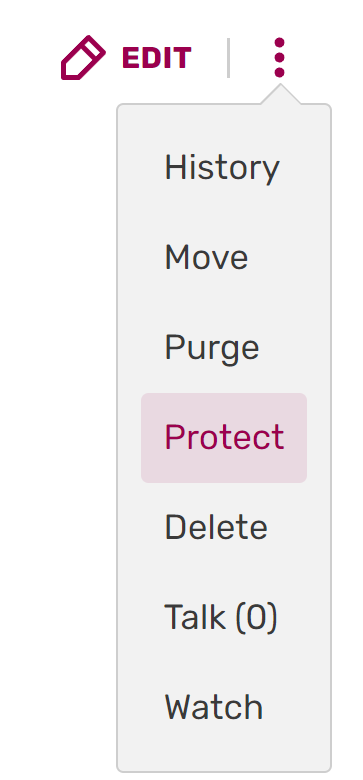

The Protect button.
Page protection is the ability to limit who can edit a page. Administrators and Content Moderators have the ability to both protect and unprotect pages, should the need arise.
A page that is protected will display a notice near the top when it is open for editing or when its source is viewed. This also means that clicking "Edit/Edit source" or "View source" is the quickest way to determine if a page is protected.
Uses
The majority of pages on a wiki should remain unprotected to encourage all users in the community to edit. It is against Fandom's Community Creation Policy to permanently protect large numbers of content pages.
Situations or scenarios where permanent protection should be applied include:
- Protecting frequently vandalized pages, such as the main page, on busy communities.
- Maintaining the integrity of the site's wordmark and favicon.
- Protecting community policy statements.
- Templates that contain complex code and/or are necessary for a particular wiki.
Temporary protection might be used for:
- Enforcing a cooldown period to stop an edit war, upon request.
- Protecting a page or image that has been a recent target of persistent vandalism.
Protection levels
There are three protection levels that can be chosen for each protection option. Protection levels for all protected pages can be found on Special:ProtectedPages (edit, move, and upload) and Special:ProtectedTitles (creation). Note: Protected pages only lists the highest protection level and the presence of cascading protection, if applicable. A page that is fully move-protected but only semi-edit-protected would simply display as "fully protected".
- Unprotected: Allows everybody (including anonymous users if that is enabled) to edit and move the page.
- Semi-protection: Prevents anonymous and non-autoconfirmed users from uploading new file versions, editing, renaming, and/or creating a page (if it does not exist). This protection level is usually sufficient for most purposes and can be set by choosing "Allow only autoconfirmed users" in the options list.
- Full protection: Limits uploading new file versions, editing, renaming, and/or creating a page (if it does not exist) to administrators and Content Moderators. This protection level is strongly recommended for a wiki’s community policy page, the wiki’s home page, wiki wordmark, or a favicon. It can be set by choosing "Allow only administrators" in the options list.
Protection types
- Edit protection: Limits who can edit a page.
- Move protection: Limits who can move a page. By default, the move protection level will match the edit protection level, but they can be set independently of each other as well.
- Upload protection: Limits who can upload a new version of an existing file.
- Create protection: Limits who can create a page that does not yet exist or has been deleted. This can be useful to prevent the repeated creation of unwanted or maliciously named pages.
- Cascading protection: This option extends full protection to all templates and files included on the page.
Step by step
Protecting pages

- To protect a page, photo, or template, click on the arrow on the "edit" button next to the title to produce a dropdown menu. Then click "Protect."
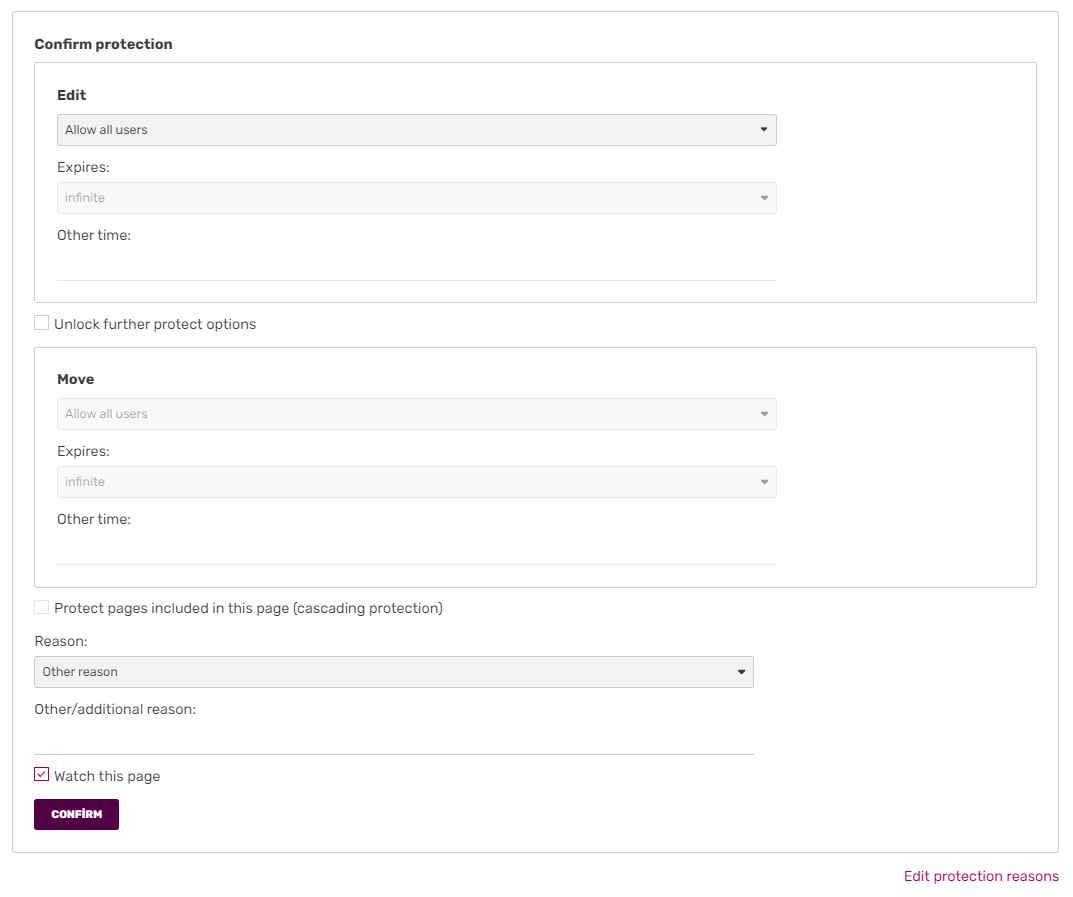
- On the protection page that then appears, you can set the desired protection level.
- You may want the page move protection to be set at a different level than the editing protection. By default, they match. To set a different level, select the check box in the "Move" section, then choose which protection level you would like.
- To set cascading protection, click the check box next to "Protect pages included in this page (cascading protection)."
- Select a default reason for protection in the dropdown menu or add in your own reason in the box below.
- Click "Confirm" to save your changes.


The edit button after protection
Unprotect
- To unprotect or change the protection for a specific page, use the Edit button dropdown to visit the protection page for it.
- Remove or alter the protection options.
- Click "Confirm" to save your changes.
Cascading protection
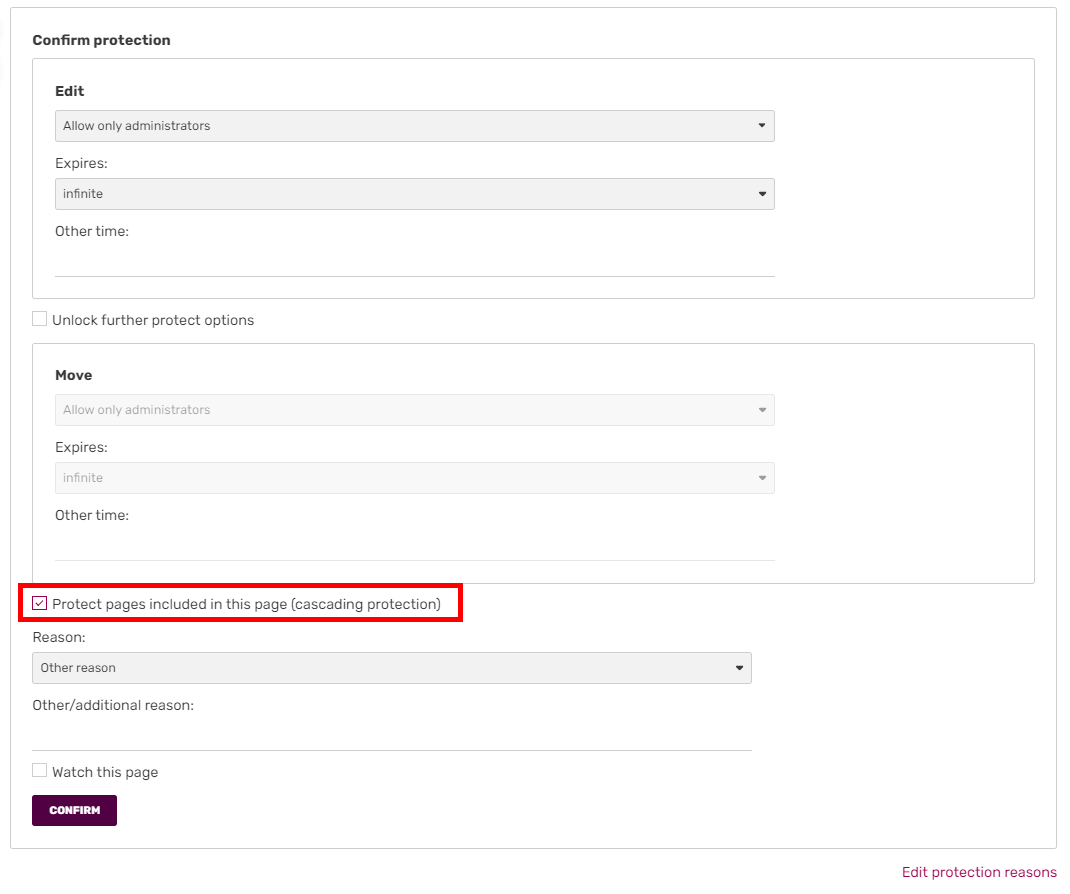

Confirming protection. You need to check the "cascading protection" box in order to activate cascading protection.
Cascading protection is a form of page protection that allows you to protect a page so that all templates and images on the page will also be protected without needing to protect them individually. This is useful on pages, such as a wiki main page, where most of the included images and templates are used only on that page.
To use cascading protection, just click the "protect" link as usual; cascade protection is there among normal protection options. The page must be fully protected in order to activate cascading protection.
General advice
- Do not make the common mistake of protecting pages unnecessarily. A single vandalizing/disruptive edit (or the fear of such happening) is not a reason to permanently full-protect a page against all edits. You should also assume editors are trying to help and contact them before taking any actions.
- Page protection levels should make sense. If a page is repeatedly vandalized by IPs, then semi-protection will stop that; full protection is not necessary. If two established editors are having an edit war, then temporary full protection of the page is needed.
- Most page protections should be temporary so that they expire when the current problem is past.
- If IP vandalism is a problem on most or all pages on a wiki, disabling anonymous editing through WikiFeatures is a better solution than mass page protection.
- Talk pages should not be protected except in extreme circumstances.
Next pages
- Learn about protecting an entire community
- Read the administrators' how-to guide
Further help and feedback
- Browse and search other help pages at Help:Contents
- Check Fandom Community Central for sources of further help and support
- Check Contacting Fandom for how to report any errors or unclear steps in this article