Sometimes, a community just stops. Editing dries up. The administrative staff leaves. No new editors arrive. Outdated information builds up without editing. It becomes inactive.
And then you discover it. You want to reform it. You want to update the wiki's local navigation. You want to edit the CSS or JS pages. But you can't, because you're not an admin, and there is no bureaucrat to promote you.
In this situation, you can adopt the community.
With the demonstrated permission of your community, you can also use the Adoption: Requests page to grant you rights when an otherwise active community has no active bureaucrat, and therefore no practical method of promoting its users.
How to Adopt
Follow these simple steps and you will be on your way to adopting a community!
- Read over the adoption guidelines to make sure you are eligible to adopt the community, and that the community is eligible to be adopted.
- Do preparatory work on the community in question.
- Scroll down and click Adopt Wiki on Adoption: Requests.
- Answer the questions that appear so the staff member who reviews your request has a bit more information.
- Click Submit and your request will be online!
If the request is accepted, you will receive a probationary adminship which you can extend to a permanent one after a month.
Preparatory Work
The most common reason for requests to be unsuccessful is lack of preparatory work. The act of filling out the adoption request form is really the final step in the process of adopting a wiki. Before you do that, make sure you can answer yes to all the questions below:
- Have you edited the wiki daily or nearly daily during the last ten days? Five to seven days out of ten with relevant edits are usually considered sufficient.
- Have you made or heavily expanded at least one topical page?
- Have you made a public notice on the wiki about the intent to adopt with ample time to respond?
If the wiki has an existing community, then you will also need the consent of that community. This can be done using talk pages or message walls to contact the existing contributors, using a discussion post, a blog post, or all of the above. But there must be on-wiki notices and opportunity for discussion on the wiki for the staff member to check.
The period of discussion between the public notice and sending in an adoption request should be at least seven days.
Note: If the wiki in question does not have any other active contributors, then the public notice, discussion, or community consent is not a strict requirement. It is, however, a good idea to make such a notice anyway, in the case that other contributors show up during the preparatory work period. It also demonstrates a willingness to work and communicate with other contributors to the wiki.
Important notes about the process
Once your request is made, please allow up to a full business week for a reply from a staff member. During this time, you should continue to be active in the community. Replies will come from Fandom staff; you can identify them by their use of the tag in their signature.
You cannot edit the request after it has been submitted, so please complete it as fully as you can.
When your request is reviewed by a staff member, it will be marked as "completed", no matter whether it's approved or declined.
In the case of unsuccessful requests, staff may ask you to contact them on their Community Central message wall to provide more information, or they may tell you to re-apply with a brand new application when you've come into better compliance with the guidelines.
Should you have any questions about the resolution of your completed request, please leave a message on the wall of the staff member who answered the request.
Probationary Adminship
If the adoption is successful, you will normally receive a temporary promotion to admin, which will last for 30 days. After the 30 days are up, those rights are reverted. Instead, you will have to visit Adoption: Requests again, click "Extend permissions", and then fill in the form under "Extend temporary advanced wiki permissions".
You are expected to regularly edit the wiki and use your admin rights during this probationary period, e.g. by updating the wiki navigation bar or using the Theme Designer. Aim for regular contributions, e.g. daily or every second day, over at least three weeks for this before you request having your rights extended.
You will receive permanent bureaucrat and admin rights once the request to extend permissions is accepted.
Note that you can still ask for extended rights for some additional days, even if your initial temporary admin rights have expired.
Can I participate in the process?
Yes! The easiest and best time to do so is during the initial discussion period of five to ten days which falls between the potential adopter posting notice of intent and them sending in the request for adoption to staff.
If you have specific knowledge about a particular request — maybe you're an admin on a wiki that's up for adoption — please reach out to a staff member currently handling adoptions. You can figure out who that is by clicking here and then looking for people appearing recently in the "last author" column.
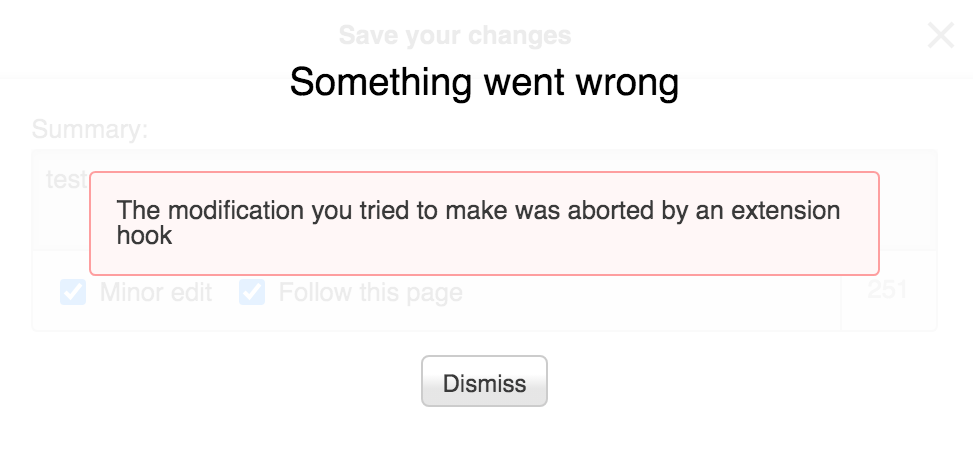

If you use the VisualEditor, you might see an error message like this if you try to publish edits to an adoptions request.
Otherwise, the Adoptions Team need to judge the application solely on the merits of the applicant's original statement.
Therefore, if you try to publish edits on an adoption request, you'll get an error message. In most cases, that error message will helpfully point out that you can't edit the request. Unfortunately, the message is less clear in our VisualEditor.
FAQ
- You do not need to adopt a community to merge it with another, larger community on the same subject. For more information on how to merge communities, see Help: Merging communities or ask a staff member for guidance.
- You do not need to adopt a community that you yourself founded. You already have admin and bureaucrat rights.
- You may use the adoptions process to gain bureaucrat rights when you already have administrator rights. Make sure to get support from any other active admins first.
- If there are recently active administrators, but no bureaucrats to grant the rights, you can adopt the wiki with the administrators' support. Make sure to include a link in your request to where they supported your promotion.
- More than one user can request an adoption together, but there must be clearly stated agreement as to what rights (administrator/bureaucrat) each person will get linked in the request.
- Demonstrated editing ability on another wiki cannot be considered. What's important to the adoption process is your work on the wiki you wish to adopt. We need to see not just that you can edit, but that you're actually interested in the topic of the wiki at hand.
- Administrators who have been inactive for more than a year will be removed upon successful adoption. If your wiki has admins who have edited within the last year, though, make sure you reach out to them. Who knows? A little message may be all it takes to get them back in the game!
Next Pages
Further Help and Feedback
- Browse and search other help pages at Help:Contents
- Check Fandom Community Central for sources of further help and support
- Check Contacting Fandom for how to report any errors or unclear steps in this article