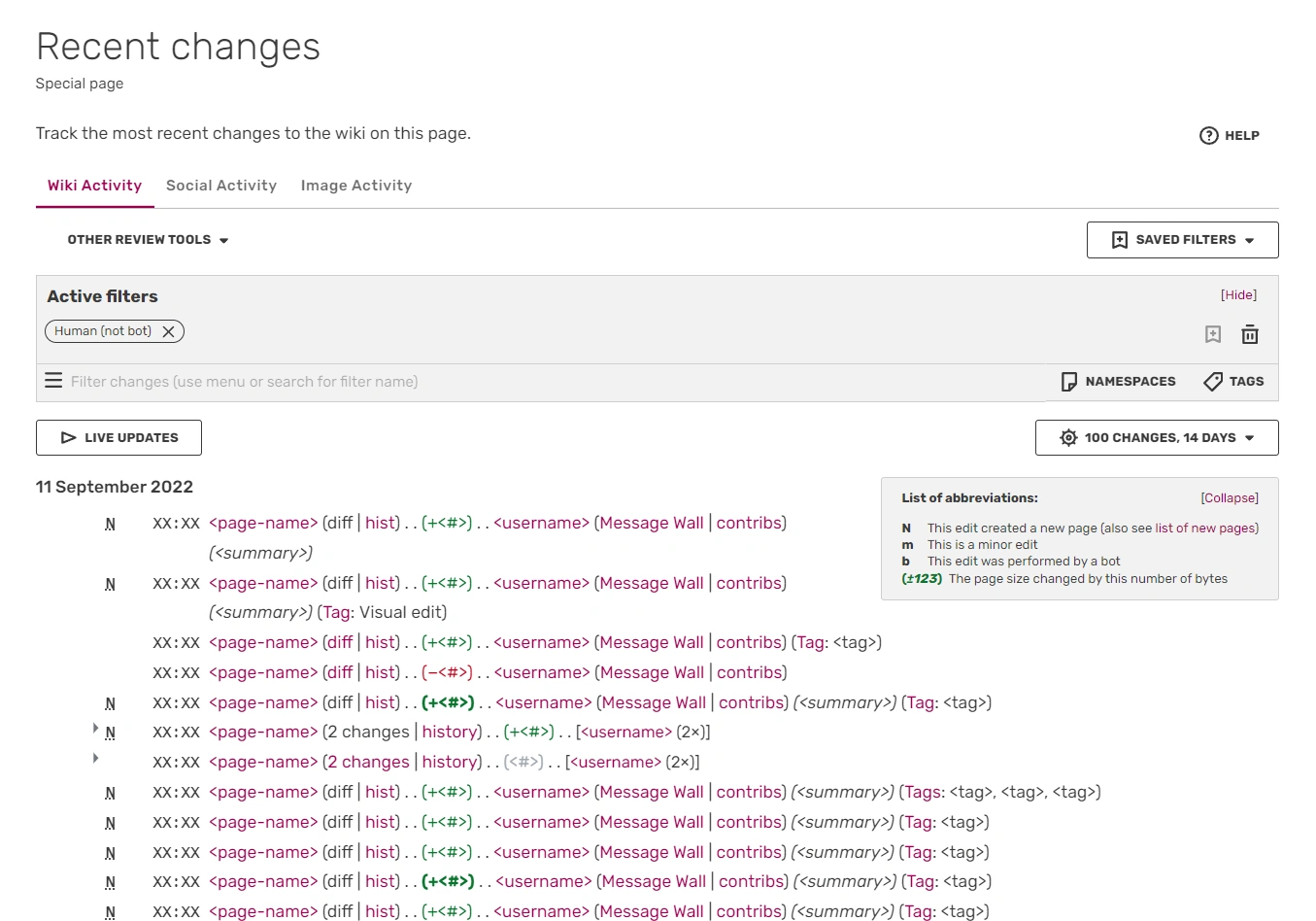

A screenshot of a recent changes list
Recent Changes (sometimes referred to as RC) is a record of all recent edit activity on a wiki.
Recent Changes is a way of monitoring a wiki. It can also be really helpful as a way to look back and find something you edited, uploaded, or removed. It's a quick short-cut to seeing what's happening on each wiki you visit. Whenever a change occurs, it is listed along with the user who made the change, the time, a link to the edit, a link to the user's message wall, a link to the user's contributions, what the user said in the 'edit summary' box, and what type of edit it was. Recent Changes can be found at Special:RecentChanges.
Recent Changes does not list activity on social features: Discussions, message walls and comments on articles and blogs. Those can be found on the Social Activity Feed.
How to interpret the log
An example change:
- N 21:02 Main Page (diff | hist) . . (+33) . . User:Random (Message Wall | contribs) (example edit)
N, m, b or no letter at all.
- These are listed before the page name.
- N signifies that the page is a new page.
- m means that the editor marked the change as a minor edit.
- b signifies that the page was edited by a bot.
- If there's no letter before the page name, that means it was a normal edit. It could have been something like adding a section or sourcing claims.
Page name
- The page name is listed and links to the most recent version of the page (including for images and files).
Timestamp
- A timestamp places itself before the page name, and is shown in the time zone you have chosen in your preferences.
'diff' and 'hist' links.
- diff – takes you to the page diff view, which shows you the difference from the last version in comparison with the newest version.
- hist – takes you to the page history where you can compare old versions of the page.
Colored numbers
- The positive/negative numbers after the page name show how many bytes (text characters) were added to or removed from the old page, which gives you a rough idea how much the page has changed.
- This can be very helpful in spotting great new additions, or page-blanking vandalism.
Italic text inside the parentheses.
- The italic comment inside the parentheses is the edit summary of an edit: a small comment explaining how someone changed a page. For example, if you cleaned up a messy page, you could leave cleanup as the edit summary.
- Since edit summaries are made by choice, not all edits in recent changes will have edit summaries.
Text becoming bold
- If you watch a page within any namespace (either manually or by making an edit), that page will appear as bold in recent changes.
Tags
- Tags show additional information about the edit, such as which editor was used (ex: 2017 Source Editor, Visual Editor etc).
Recent changes tools
The look of Recent Changes can be changed. In the "Recent Changes" tab of Preferences, you can find the option Use non-JavaScript interface. If it is checked, read the section § With JavaScript interface off.
With JavaScript interface on
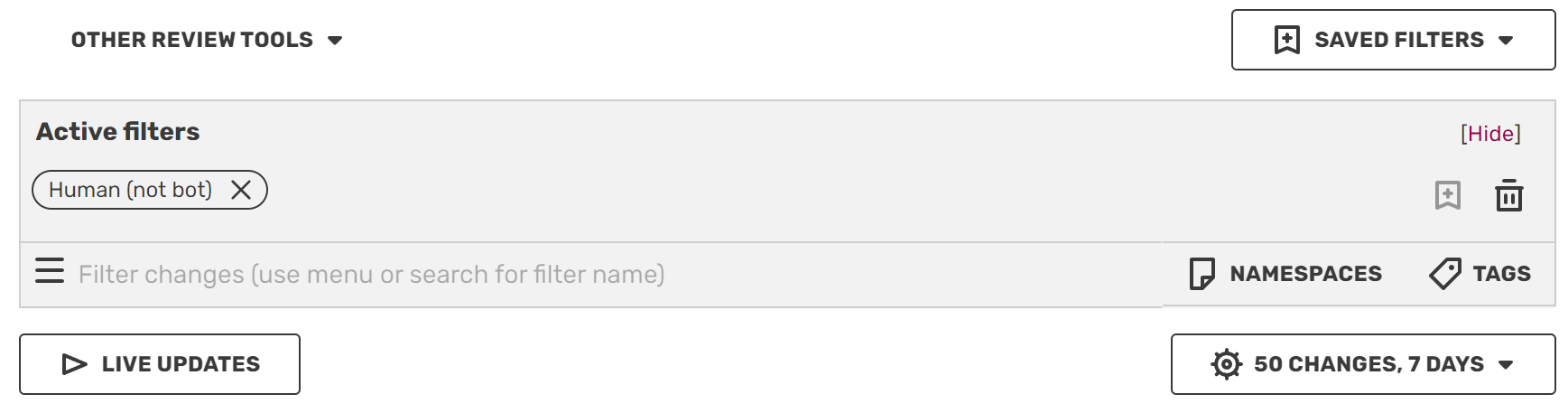

Tools, all are above Recent Changes list
Active filters are rules, which filters the full Recent Changes to display only edits that fit any active filters. It is also possible to filter pages through defining namespaces. You can save these filters and then find them in Saved Filters above the Active Filters box.
Under Active Filters, there are two buttons.
- "Live updates" is a button that can be clicked, which activates live refreshing to show new edits as they are made.
- Just under the right side of the Active Filters space is a box that changes how many edits can be displayed within a certain time range. For example, setting this to "250 changes, 12 hours" displays up to 250 edits made in the last 12 hours.
- It is possible to display at least 50, 100, 250, 500, 1,000, 2,000, 3,000, to up to 4,000 edits that were made within the last:
- Hour, 2 hours, 6 hours, 12 hours, day, 3 days, 7 days, 14 days, 30 days, or 90 days.
- This box also provides the option to "group results by page", which minimizes consecutive edits made on the same page to just one result. This will include the user(s) that made the edits and how many they made.
With JavaScript interface off
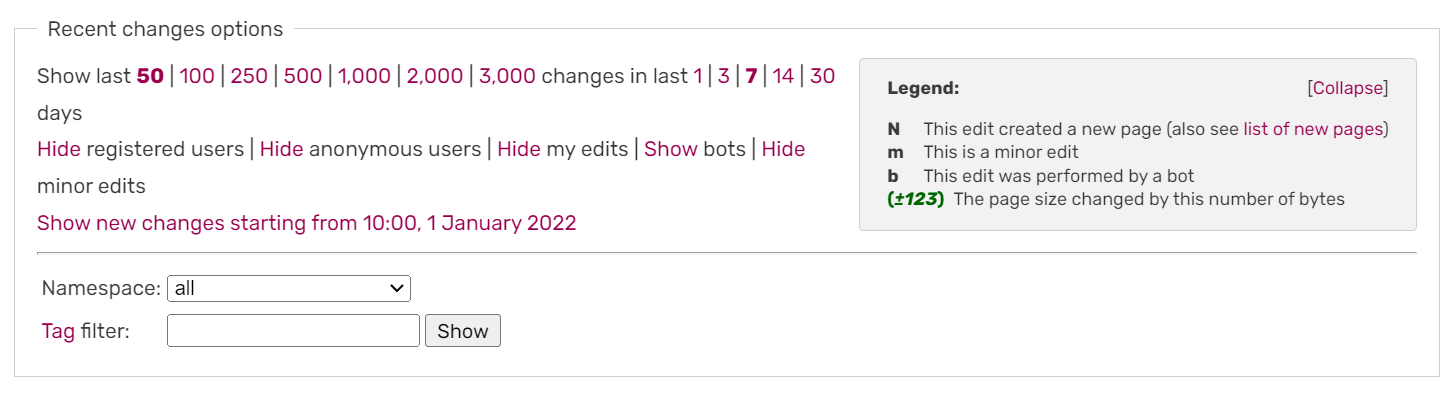

Tools available in this type of interface
The first line provides links to allow you to increase the size of the RC page, so that you can see more edits going further back in time. (Items do eventually drop off of the Recent changes — you can't go back forever.)
The second line allows you to hide or show edits marked "minor", "bot", "anon", "logged-in" or your own edits. Each of these is helpful to different kinds of editors, who use Recent changes for different tasks.
The drop-down box allows you to show only recent changes for a particular namespace, such as 'File' or 'Template'.
The "Hide grouped recent changes" link turns off and on the advanced Recent Changes page, described below.
Note: This box of links can be collapsed and reopened by clicking the 'Recent changes options' heading. The expanded/collapsed state is remembered on a per-community basis.
Advanced Recent Changes
By default, "advanced/enhanced/grouped recent changes" is enabled. The preference is located in the "Recent Changes" tab of Special:Preferences, under "Advanced options".
It groups recent changes per day, where "day" is defined by the time in your preferences. For each day, it groups the changes for each article, and displays each group in order of the most recent edit.
This feature is especially useful if many edits are likely to occur to a single article over the course of a day, as that article will only show once on the list, with all changes to it grouped together.
Standard Recent Changes
If you turn off advanced recent changes in your preferences, Recent Changes will show every edit listed in order. This can be useful for getting a clearer view of the overall activity on a wiki.
Transcluding Recent Changes
This special page 'Recent Changes' can be transcluded into other pages, with the first unnamed parameter specifying how many entries should be displayed.
{{Special:RecentChanges/50}}
Additional parameters may be used in a comma separated list such as:
{{Special:RecentChanges/days=5,limit=40,hidebots,hideminor}}
See the full parameters list on MediaWiki.
Next steps
Further help and feedback
- For a guide on the social activity tab, see Help:Social Activity Feed.
- Browse and search other help pages at Help:Contents
- Check Fandom Community Central for sources of further help and support
- Check Contacting Fandom for how to report any errors or unclear steps in this article