Files like images and sound clips are an integral part of wikis. They allow readers to get a sense of the information in pages with visual guides. To do this, you must first upload files to the wiki where you want to use them. You must be logged in to do this.
The instructions below are for the standard editor.
Step by step
There are a few different options you can use to upload files. Some are a bit more complex, but each one leads to the same result: populating your pages with visuals!
Edit mode
The easiest way is inserting an image directly via the editor.
- Drag and drop the file in the "Drop files here" toolbar.
- If this bar isn't there, go to your preferences > "Editing" tab > and be sure "Enable the editing toolbar" is checked.


- Click "Upload this file" to upload all the files that were dropped in the toolbar.
- Click "Insert as image" or "Insert as link" (for each image) to include the image on the page or as a link where the caret, or the text cursor, is located in the editing area.
Special: Upload
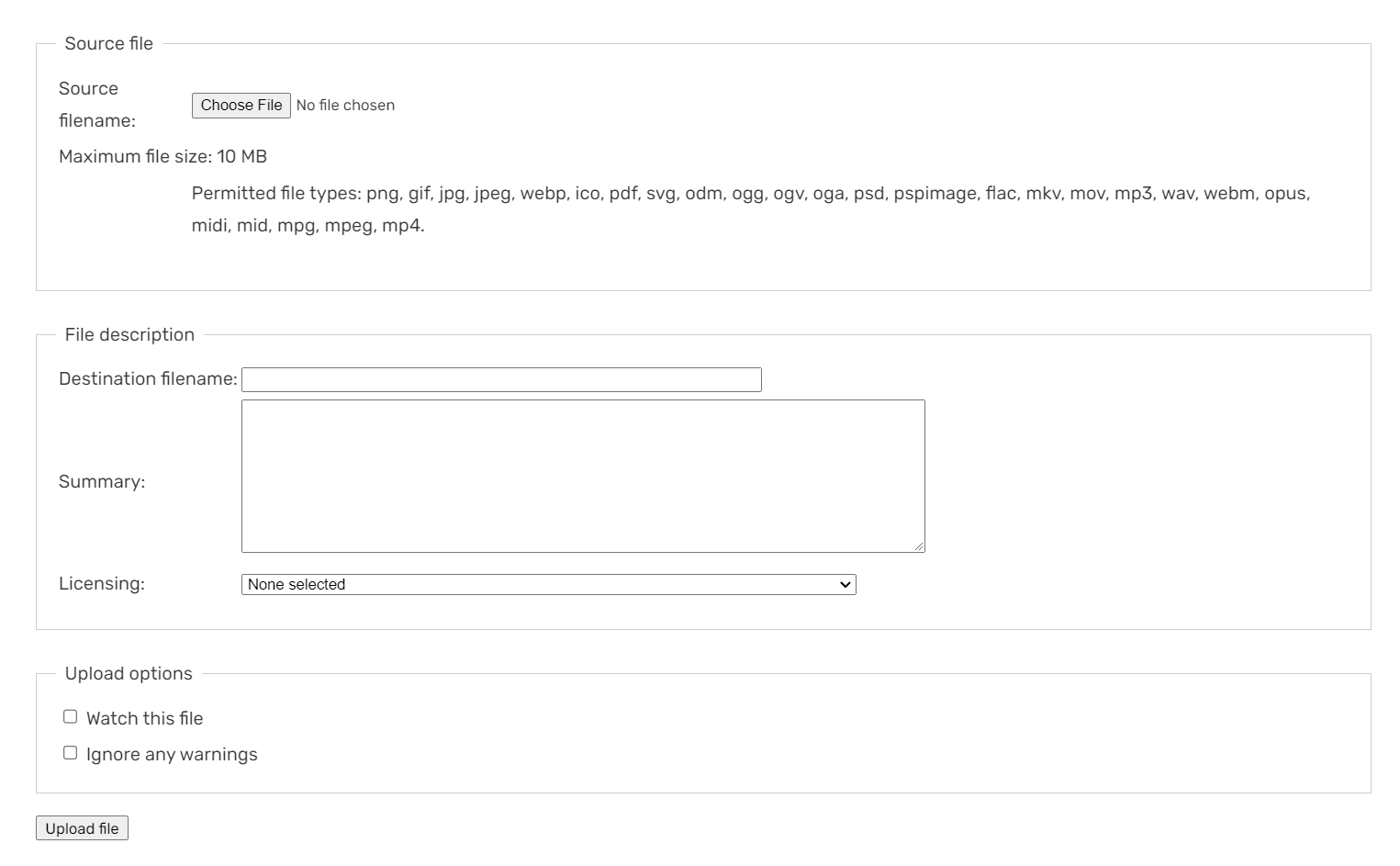

The 'Upload a file' page
Another option, though more complex, is Special:Upload. You can find this by typing it into the browser's URL bar, under the header shortcuts menu, or adding it to your toolbar.
- Click "Choose File" next to the "Source filename:" box to find the image on your computer.
- You can rename the image in "Destination filename:" if you would like.
- In the "Summary:" section, you can add a description and a source to the image.
- Select the license in the "Licensing:" section.
- Click "Upload file" to upload an image to your wiki, and then place it into your article!
Some communities have customized the Special:Upload page, so be sure to take note of any local instructions.

Special: NewFiles
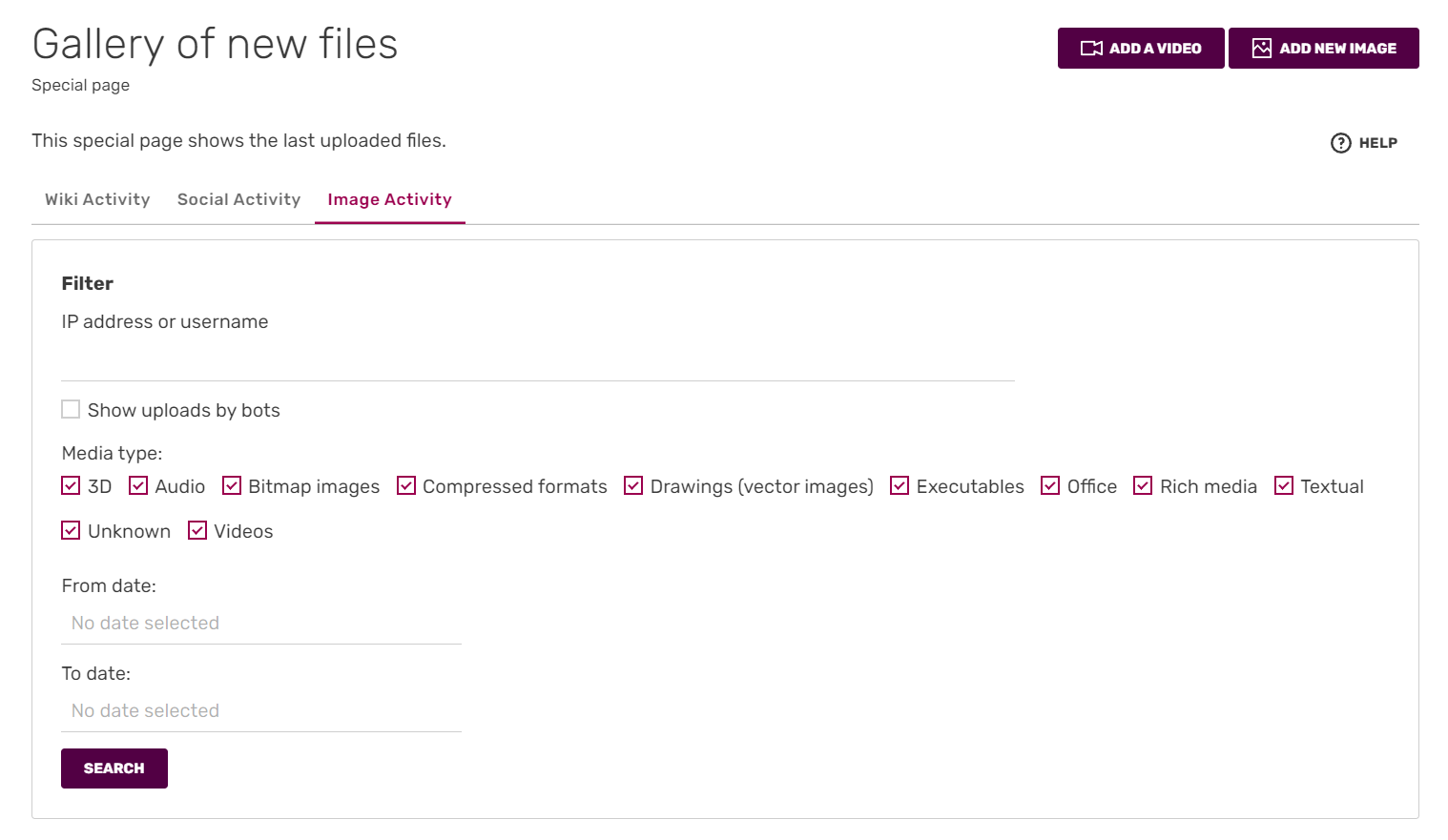

To add new image, click Add new Image button, located at top right of the page. Notice, that you can also add new video here.
You can also upload images via a button in Special:NewFiles, a page where you can find all recently uploaded files on your wiki.
- Click the "Add new image" button. You will be given a dialog to upload an image.
- Click "Choose File" to find the image on your computer.
- You can rename the image in "Filename" by clicking "More Options", then enter the renamed Filename in the Filename input box, if you would like.
- In the "Caption" section, you can add a description and a source to the image.
- Select the license in the "Licensing" section.
- Click "Upload photo" to upload an image to your wiki and then place it into your article!
Visual Editor


"Add New Image" in VisualEditor
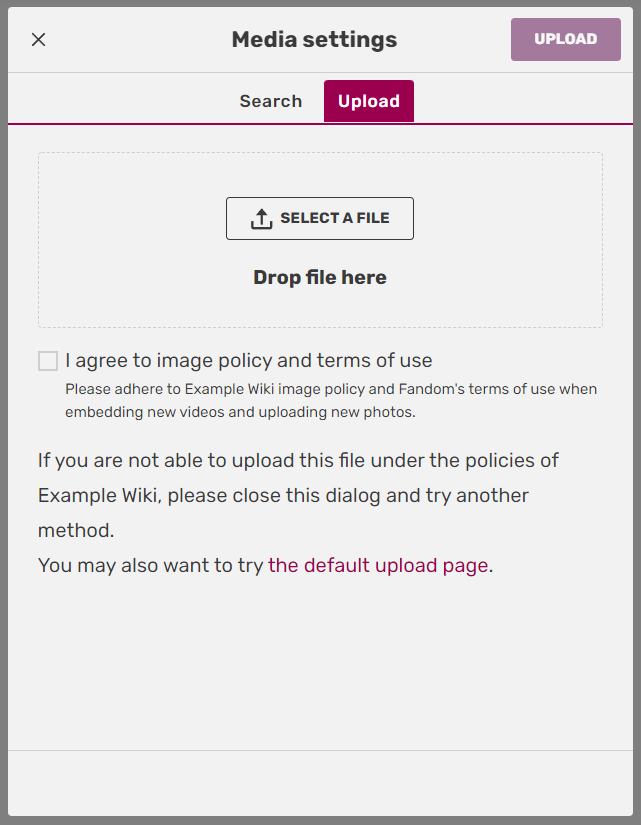

Upload File Options in VisualEditor
Another option is by uploading images while using Visual Editor. The uploading images option can be found on the toolbar, next to the option to add an image gallery.
- Click on the image button, a pop-up box will appear.
- Drag and Drop your files or select "Upload".
- Choose the files from your computer.
- You can rename your files by clicking on the filename and changing the name of the file.
- Select the license in the "Licensing" section
- Click "Apply changes" to upload your image in the article!
Upload a newer version
If you think that a current file is a low quality, you can replace that by using the following steps:
- Go to the desired file
- On the bottom of the "File History" section, click on the link that says "Upload a newer version of this file"
- Follow the general upload steps.
Note that current and newer files must be the same type. For example the current version like .png should be same to the newer file. Replacing file extensions like .webp with a different one like .png won't work on uploaded files.
Other questions
What file types are allowed on Fandom?
By default, the following file types can be uploaded: png, gif, jpg, jpeg, webp, ico, pdf, svg, odm, ogg, oga, flac, mkv, mov, mp3, mp4, wav, webm. More file types can be added on request, for example ttf, otf, woff, and woff2 (fonts).
The types of file allowed to be uploaded is temporarily limited for technical reasons.
To include videos that exceed the maximum upload size, see Help:Videos.
How much can I upload?
The maximum size of uploads is 10 MB. The maximum image resolution is 12.5 million pixels.
There is no limit to the number of files you can upload, but images and other files should be uploaded for use on the wiki - they shouldn't be used just as file stores!
Re-size an image
When uploading an image, it is okay to upload it at the largest allowed size you can upload to the wiki. This is because the software will re-size the image that people see in articles to a more appropriate size without making them need to load the large image.
See also
- Learn about uploading multiple images at once
- Learn about the image description page
- Learn about image copyright tags
- Special:Log/upload: Shows all uploads
Further help and feedback
- Browse and search other help pages at Help:Contents
- Check Fandom Community Central for sources of further help and support
- Check Contacting Fandom for how to report any errors or unclear steps in this article