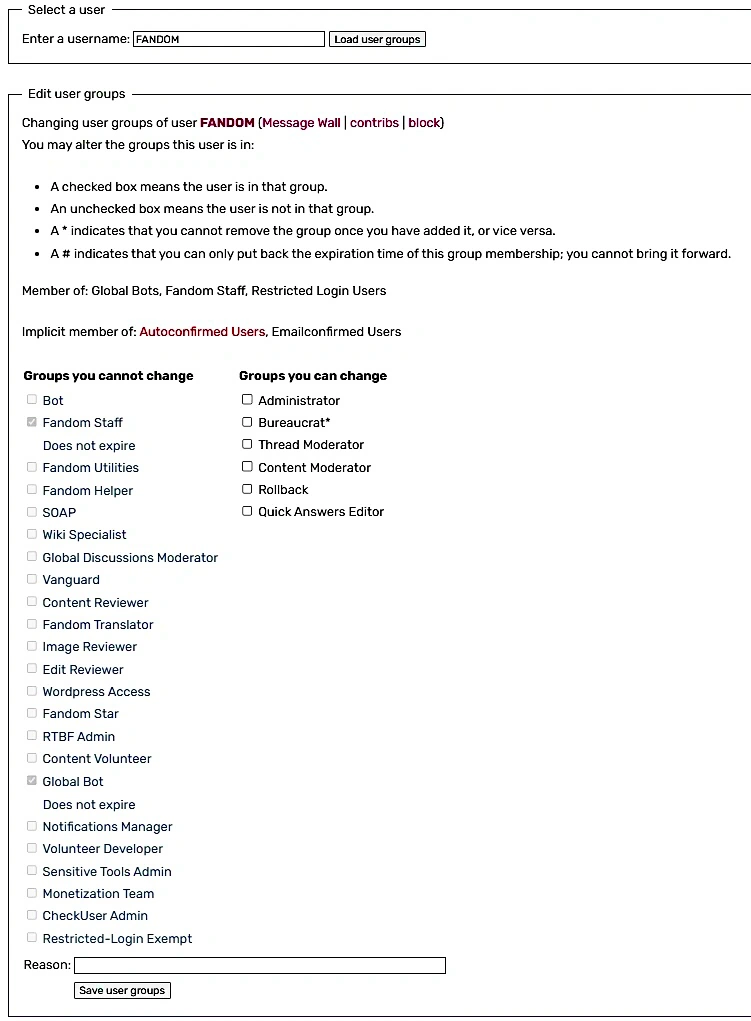

The User Rights control panel on wikis
A user right is a special type of permission that allows a user to make a change or perform a task for a community. A "user group" is a set of permissions or abilities. The most commonly recognized user group is an "administrator" or "admin", also known as a sysop user group. A list of user rights by groups can be seen at Special:ListGroupRights.
To add or remove users from these groups, admins or bureaucrats can go to Special:UserRights. Some groups can only be added or removed by bureaucrats or Fandom Staff.
Some communities have custom groups, but the information below applies to most.
Local level
"Local level" refers to user rights on an individual wiki. A user may have different rights on different wikis.
Administrators


Administrators, commonly shortened to "admins" and also known as "sysops" (short for System Operators), are active and trusted users who are generally chosen by the community and also have access to the following rights:
- All privileges from both the Content Moderator and Thread Moderator groups
- Block users from editing and/or performing other actions
- Granting and revoking the Rollback and Thread Moderator rights
- Editing the community's skin and format
- Editing whitelisted MediaWiki pages
For more details, see the Help:Administrators' how-to guide.
Being an administrator makes the tag "Administrator" appear next to a user's name on their profile.
Bureaucrats
Bureaucrats can change or assign user rights to people, as well as block and unblock users, so this right is generally used in addition to the administrator group.
They have the ability to promote and revoke rollback, Content Moderator, and administrator rights, as well as appointing new bureaucrats. While they cannot directly remove another user's bureaucrat status, they can remove their own. Bureaucrats also have the ability to remove a user's bot status in case the bot is malfunctioning, but bot flag requests are handled by staff after being approved (by either a bureaucrat or the community).
For more details, see the Bureaucrats' how-to guide.
Having this status causes the tag "Bureaucrat" to appear next to the user's username on their profile.
The bureaucrat status can only be removed by Fandom Staff members or by the bureaucrat themselves. Be aware that if you remove yourself from being a bureaucrat, you cannot give it back to yourself later. It is recommended to make sure there are other active bureaucrats on the wiki before demoting yourself.
Bureaucrats also cannot grant other levels of access higher than the local bureaucratic position such as Fandom Staff, Wiki Specialists, SOAP members, Global Discussions Moderators, etc.
Content Moderators


Content Moderators are special users who have additional tools available to moderate specific parts of the community. These tools are:
- Editing and moving fully protected pages
- Deleting and restoring pages and files
- Editing and moving protected files
- Protecting and unprotecting pages
- Rollback
- Patrolling pages (if the community has the recent changes patrol feature enabled)
- Deleting and restoring article and blog comments
- Deleting, restoring, editing, locking, and unlocking message wall threads
Having this status causes the tag "Content Moderator" to appear next to a user's username in their profile. See Special:ListUsers/content-moderator for a member list.
- Admins enjoy all the privileges of content moderators, so admins do not need to be put into that group in addition to being an admin.
Thread Moderators


Thread Moderators (also known as "Discussions Moderators") are special users who have additional tools available to manage conversations in various features across the community where users are having discussions. These tools are:
- Removing and restoring threads and replies created by any user
- Closing and reopening replies
- Deleting blog comments
- Editing and deleting article comments
- Moderating the Discussions feature, if enabled
Having this status causes the tag "Thread Moderator" to appear next to the user's username in their profile. See Special:ListUsers/threadmoderator for a member list.
- Admins enjoy all the privileges of thread moderators, so admins do not need to be put into that group in addition to being an admin.
Rollbackers
Anyone can revert vandalism and bad-faith edits, but it takes a couple of clicks in the page history to get it done. However, rollbackers have the "rollback" button that allows them to undo bad edits in just one click by using the rollback link on diff pages, the user's contributions page, or the list of recent changes. The automatic edit summary for a rollback edit is (Reverted edits by X (talk) to last revision by Y). As the summary implies, a rollback undoes even multiple sequential edits all done by the last user in a page history.
Content moderators and admins (sysops) have this option by default. It can also be granted to other normal users without having to make them a content moderator or admin, simply by an admin or bureaucrat adding them to the rollback group. See Special:ListUsers/rollback for a member list of all of them.
The tag next to the user's profile can't be seen unless the UserTags JS script is enabled on your wiki.
Quick Answers Editors
Quick Answers Editors have the ability to access Special:QuickAnswers, the Quick Answers editor dashboard. Users can be given the Quick Answers Editor user group by administrators and above. It does not grant any moderation powers whatsoever. Fandom added this user right May 23, 2024, and announced it in Technical Updates: May 17, 2024.
Founders
A community's founder is automatically given admin and bureaucrat rights during the community's creation. This allows them to edit the community's skin and format. As more contributors join, it's a good idea for founders to appoint trusted users as admins and moderators. When promoting someone to be a new bureaucrat, be aware that the founder has no higher status than any other bureaucrat, and cannot demote other bureaucrats.
The "founder" status by itself does not grant any special permissions. Founders also cannot grant any level of access higher than the local bureaucrat position such as Fandom Staff, Wiki Specialists, SOAP members, Global Discussions Moderators, etc.
Bots
A bot (short for robot) is any automated process, program, or script that makes it easier for a user to make tedious or repetitive edits and actions on a community. When a bot is running in quick succession, the recent changes log can sometimes be overtaken, making it harder to spot more substantial edits by regular users. Giving an account a "bot flag" will hide these edits from the recent changes list (although any editor can still choose to see them by clicking "Show bots").
On Fandom, a user who wishes to use a bot should set up a separate account for it, and then talk with either other community members or a bureaucrat to ask whether they approve of the creation of a bot. After receiving approval, the bot owner or a bureaucrat can contact Fandom Staff for the bot to be flagged for that wiki. On a few wikis, local admins or bureaucrats also have the ability to flag an account as a bot locally.
Having this status causes "Bot" to appear next to the username on the bot's user page.
CheckUsers
CheckUsers have the ability to check another user's IP address, as well as the ability to check what users have edited or posted using a particular IP address, and view the confidential CheckUser log, which should never be accessed by the public. This ability is generally only available to Fandom Staff, Wiki Specialists, members of SOAP, and Global Discussions moderators, but on very large communities where sockpuppetry is a major problem, access can be considered.
Global level
Anyone who visits Fandom can view and read pages. Unregistered (anonymous) users also usually have the ability to edit and add pages to the wiki, though some communities may require logging into a Fandom account first.
- Note: As of July 12, 2024, users that are not emailconfirmed can no longer edit or post on wikis designated as "aimed at children". See this technical update blog post for more information.
- Note: As of May 29, 2025, discussions require users to be autoconfirmed due to the influx of spammers. See this technical update blog post for more information.
Registered users
Users who have created an account and logged in can:
- Customize the appearance and features of the community by setting their preferences and personal CSS and JS.
- Upload an image, video, or other file.
- Add pages to their watchlist, which can be used to track edits to a particular page.
- Maintain a user profile.
- Remove advertisements from all pages for themselves (except for the main page of each community).
- Create messages and posts.
- View comments on pages (but can comment if they are also autoconfirmed).
Emailconfirmed users
Emailconfirmed users are users who have confirmed their email in their preferences. They have access to the following tools:
- They no longer have to go through a CAPTCHA when inserting an external link into a page, blanking a page, or creating a new account.
- They can comment and reply on pages (as long as they are also autoconfirmed).
- They can create any wiki.
- They can edit wikis that don't allow unregistered editing.
- Create posts (as long as they are also autoconfirmed).
Autoconfirmed users
Registered users who have been with Fandom for at least 4 days also have access to the following tools:
- They can edit semi-protected pages.
- They can move pages.
- They can add new pages to wikis.
- They can create article and blog comments (as long as they are also emailconfirmed).
- Create posts (as long as they are also emailconfirmed).
- They can upload files (if the wiki requires you to be autoconfirmed to upload).
Authenticated
Authenticated users are the official accounts of large companies, typically from the video game industry. The group signifies that the veracity of the account was checked for by Staff. They are users who are notable or famous, such as a game designer or developer, or a renowned musician. A user must be verified by Fandom Staff as legitimately being that important person before they get this right.
Fandom Staff


Fandom Staff are full-time Fandom employees and they have full access to all Fandom communities and features. They are shown in Special:ListGlobalUsers/staff on any wiki and often have a special staff signature () when they sign their comments. Staff have tools to support them in helping to maintain all of Fandom. Please see Help:Contacting Fandom for details on how to contact Fandom Staff. Members of staff have the special "Staff" tag next to their username on their profile.
Wiki Specialists
Wiki Specialists are part-time staff members. They are here to help wikis grow and thrive and ensure that the latest and best content is up on our communities as soon as new information is available. Therefore, they have extended user rights on all Fandom communities. See Special:ListGlobalUsers/wiki-specialist for a member list. Wiki Specialists have the "Wiki Specialist" tag on their profile and often a special tag () in their signatures.
SOAP


The Spam Obliteration and Prevention team, (abbreviated to SOAP), are experienced and involved users who combat cross-wiki spam and vandalism. Therefore, they have extended user rights on all Fandom communities, including access to many additional tools that help them to detect spam and vandalism. See Special:ListGlobalUsers/soap for a member list. Users in this group will have a "SOAP" tag next to their profile.
Global Discussions Moderators


Global Discussions moderators are a group of users with permissions related to the Discussions feature. Their focus is on community management, community building, and social concerns within the Discussions feature specifically. They are assigned to work on communities that have requested help or that have been identified by Fandom staff. See Special:ListGlobalUsers/global-discussions-moderator for a member list. Users in this group will have a "Global Discussions Moderator" tag on their profile.
Content Volunteers
Content Volunteers are users who have additional tools available to work on content-related tasks in non-English communities. These tools are:
- Editing and moving fully protected pages
- Editing and moving fully protected files
- Rollback
- Editing the community's skin and format
Having this status causes the tag "Content Volunteer" to appear next to a user's username in their profile.
Edit Reviewers
Edit Reviewers are third-party contractors who assist Fandom in moderating flagged edits across wikis. They have similar rights as Content Moderators across all communities. This user group is still new and under development (as of 2025). More information can be found on the user group's help page.
Other groups
Some other groups shown on Special:ListGroupRights are either connected to Staff-only extensions or unused.
Why might rights be removed?
Bureaucrats can remove the administrator or lower local user right (e.g. content or thread moderator) when necessary. In most cases, the community should be consulted.
While the bureaucrat themself can remove their own Bureaucrat right, only Fandom Staff and Wiki Specialists can remove other users' bureaucrat status, but this rarely happens. Examples of situations when staff will remove bureaucrat or other rights include:
- A user is inactive, and the community asks for the removal.
- A user's account is globally disabled, and a member of the community asks for the removal.
- A user is inactive on the wiki for more than a year, and someone adopts it.
- Community request, after a discussion among more active users.
- The rights were abused.
- They are found to be editing abusively as an alternative account (sockpuppet).
- They have broken Fandom's Terms of Use.
What can't blocked users do?
If a user is suspected of breaking Fandom's Terms of Use or a local community's guidelines, they may be blocked fully or partially on an individual wiki by staff or a local admin.
Fully blocked users cannot:
- Create, edit, or move pages, including their own user profile page
- Delete and undelete pages
- Protect and unprotect pages
- Upload files
- Change the user rights of others
- Add blog posts or add comments
- Perform most admin-specific actions
- Perform most discussions moderator-specific actions
- Perform most content moderator-specific actions
- Perform most rollback-specific actions
- Create new accounts from their IP address (Unless autoblock is disabled)
- Create a post, reply, or vote in Discussions
- Access certain special pages
- Purge pages
Partially blocked users can't:
- Edit any page that they were blocked from
- If a page that they are blocked from has comments enabled, the editor won't be able to add a comment to that page.
- Edit any namespace that they were blocked from
- If this namespace has comments enabled, the editor won't be able to add a comment to that page.
- Perform any action that they were blocked from
Blocked users can, however:
- Continue to view pages and logs
- Continue to edit their talk page or post to their message wall unless specified in the block or the block is global
- Continue to participate in other wikis on Fandom unless the block is global
- Continue to participate in Community Central unless they are blocked from there as well
In more extreme cases, blocked users are also prevented from posting on their own message wall or editing their own user talk page if the "cannot edit own talk page" checkbox is checked when blocking the user. If the autoblock feature is enabled, then it will prevent IP addresses used by the blocked user from editing. This will also prevent the user from creating any new accounts associated with that IP address. They will have the "Blocked" tag next to their username. See Special:BlockList to see all of the users who are blocked.
How can I find different users?
Go to Special:ListUsers, choose the wanted group(s) of users by selecting the corresponding check boxes, and click "Show" to update the list below the form. For further details, see Help:ListUsers.
Further help and feedback
- Browse and search other help pages at Help:Contents
- Check Fandom Community Central for sources of further help and support
- Check Contacting Fandom for how to report any errors or unclear steps in this article